Meeting minutes
Writes the minutes of a meeting from its notes or a text transcript, as a Word document in your brand: attendance, discussion, decisions, deferred items, actions and the next meeting. Every fact names the line of the notes it came from. It writes minutes, not agendas.
A Claude plan with code execution turned on (Setup, step 1), the brand setup run once, and the meeting’s notes or transcript as text: pasted into the chat, or attached as a .txt, .md or .docx file.
Add the skill
In the Claude web or desktop app, select Customize, then Skills › Add › Upload skill, and upload minutes-builder.skill from your download. A .skill file is a zip under another name; if it is not accepted, rename it to minutes-builder.zip and upload again. Setup walks through the screens.
Where the pack runs: see compatibility.
Ask for minutes
Start a message with minutes: and paste the notes, or attach them. “Write up the minutes from these notes” works too. If the brand setup gave you brand.json and logo.png to keep, attach both, with their names unchanged.
Send the notes as they were written. It keeps them word for word, typos included, because every line of the minutes is checked against them.
If the notes leave out the meeting’s name, its date or year, who owns an action, or the next meeting’s date, it asks for them in one go rather than filling them in. Anything you supply after the meeting is marked with an asterisk in the minutes.
Send audio, a caption file, a photo or a scan, and it asks for the notes as text: a transcription it made itself would not be your notes. Ask for an agenda and it points you to meeting agendas. Only the action items, as a one-page list, is the free action items list’s job, and minutes as a PDF, a spreadsheet or slides is another skill’s.
What comes back
A Word file with the meeting date in its name, such as KVPL_ADMIN_Collections_Committee_MINUTES_2026-10-14.docx. Decisions carry the mover, the seconder and the result where the notes record them. Anything the meeting left open sits under its own heading, “Deferred - not decided”.
When the notes name the next meeting, it also writes that meeting’s agenda as far as these minutes decide it: approval of these minutes, the open actions and the open items. The agenda skill builds it as it is, or after you edit it. In the same reply Claude says which brand it used, or that it used the neutral colors, and lists every value you supplied after the meeting.
Worked example
Kestrel Valley Public Library is an invented library. These are the notes of its Collections Committee meeting on October 14, 2026, the same meeting as the agenda on the Document Ops page, and the minutes the skill built from them with the library’s brand kit.
The notes
The file: KVPL_ADMIN_Collections_Committee_MINUTES_2026-10-14.docx, 2 pages. Phase 2 of the weeding plan, which the notes leave open, is under Deferred, not Decisions. The 3-1 vote stays 3-1, with Dana opposed.
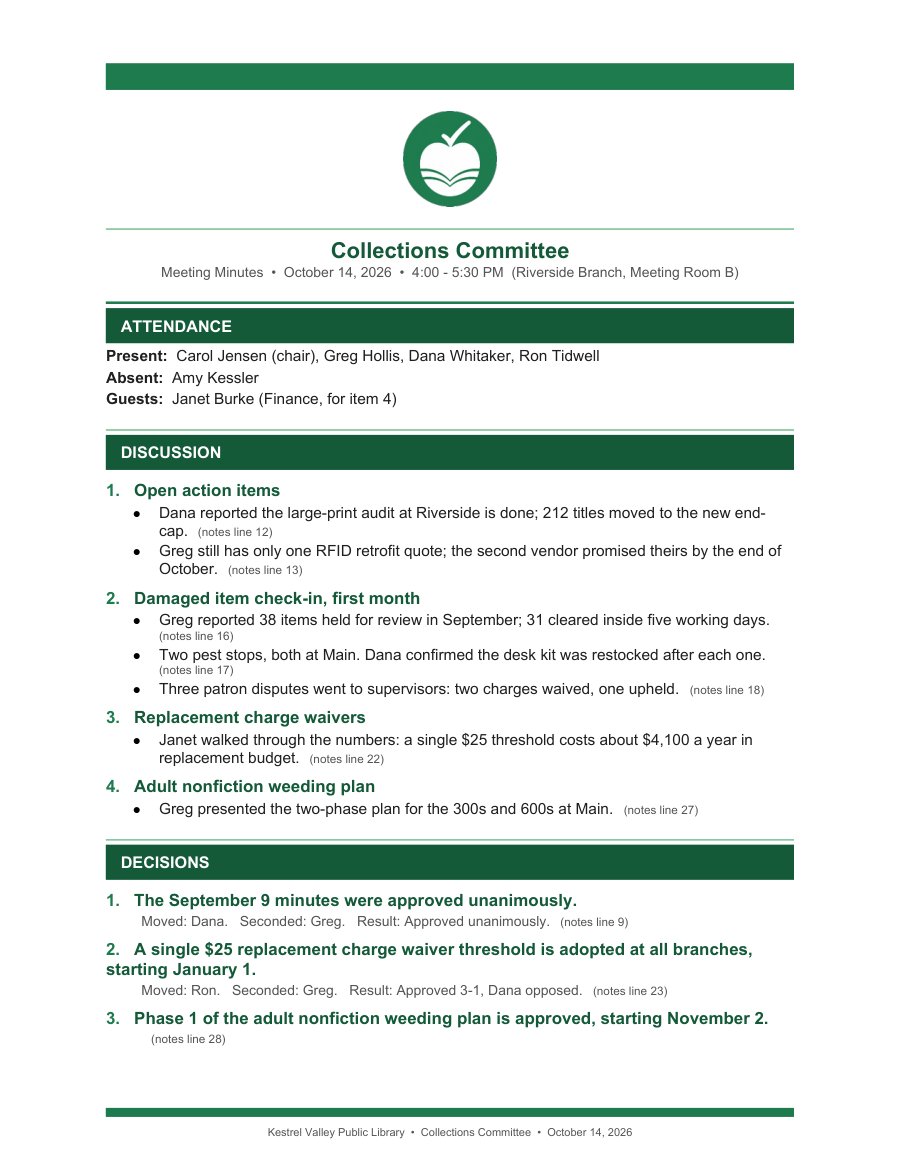
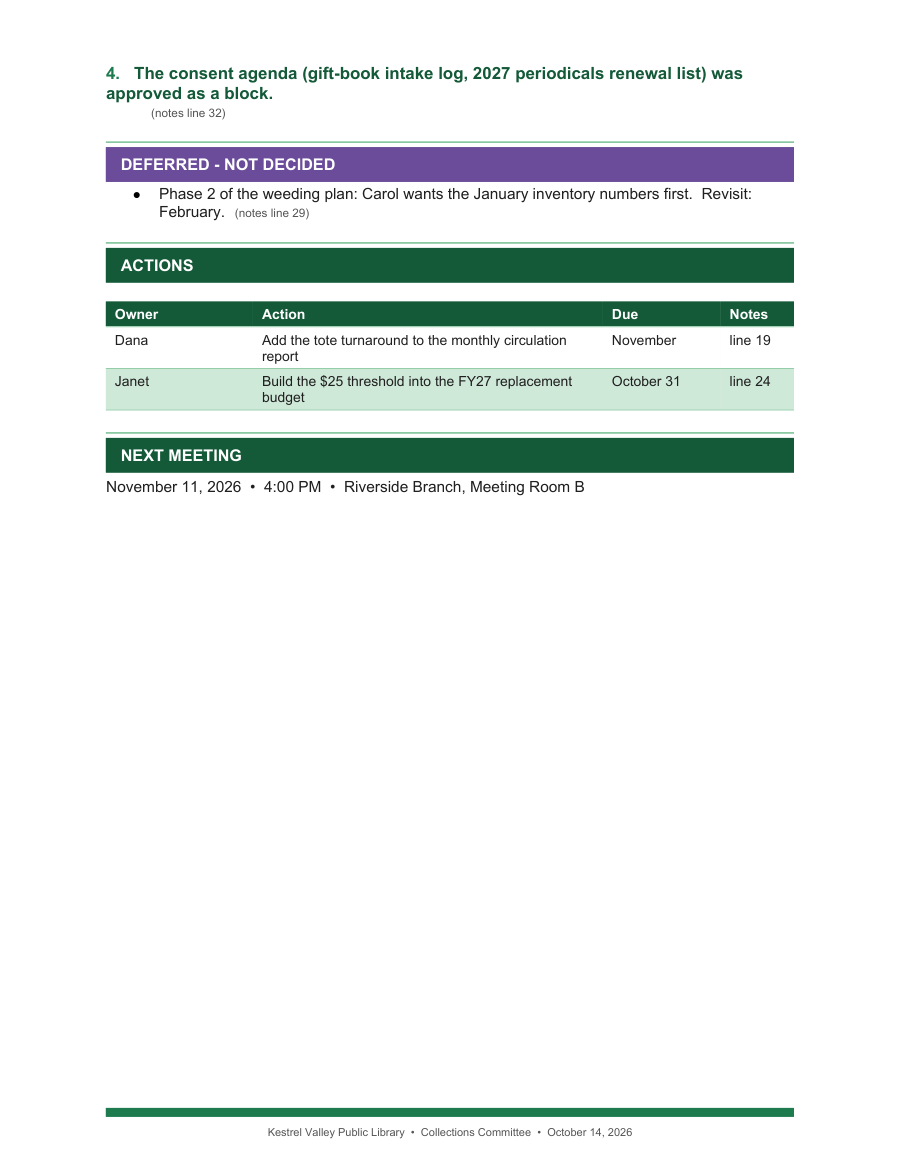
Pages 1 and 2 of what came back.
The same notes, written up wrong
A second copy of the minutes, with four mistakes planted of the kind a model makes without the skill: Phase 2 written as approved, the 3-1 vote written as unanimous, an owner the notes never name for the second RFID quote, and Amy Kessler, who was absent, listed as present. The check refused it and wrote no document:
What gets checked
Before you get the file, the skill checks it. The file goes out only when every check passes:
- every attendee, discussion point, decision, deferred item and action quotes a line of the notes, and the quote is really there;
- an item the notes leave open, with words such as “no decision”, “tabled” or “revisit”, is under Deferred, never written as a decision, and every such line of the notes is cited there;
- every action has an owner the notes name, or one you gave it when asked;
- a mover, a seconder, a vote or an approval appears only where the notes record one;
- nobody is listed whom the notes do not name, and nobody is both present and absent;
- the next meeting falls after this one;
- once built, the file name, both printed dates, the page and every table’s width.
What no check can tell you: whether a line of the minutes means what its quote says, and whether the notes are complete. A decision nobody wrote down is not in the minutes. Read each decision against its line before you send them.
If it looks wrong
It asked questions before writing anything. That is on purpose: the notes left out a name, a date or an owner. Answer them; the minutes mark each answer with an asterisk.
It is in plain colors, not your brand. The skill did not find your brand. Attach brand.json and logo.png and ask again.
It asked for the notes as text. It does not transcribe audio or read a scan. Paste the notes or a text transcript.
Claude answered like a normal chat. Start the message with minutes:. If it still does not start, see Setup, “When it doesn’t work”.
Using Claude Code instead
Extract the .skill file into your skills folder: ~/.claude/skills/ for every project, or .claude/skills/ inside one. A skill in that folder does not reach your claude.ai account, and one on your account does not reach that folder.
Needs Node 20 or newer on the machine. Nothing else to install: the one library the skill uses ships inside it.
The skill reads your brand from brand.json and logo.png, looking in this order and stopping at the first hit: the path in HPW_BRAND_KIT, the folder you build from, any folder above it, then the neutral defaults.
The minutes come with a .next-agenda.json file beside them when the notes name the next meeting. It is the agenda skill’s own content format, ready to build or to edit first.
To confirm the install, run this from the folder you will build in. Exit 0 means every file is present:
To prove it end to end, build the shipped sample from a folder outside the skill. It builds the sample and checks it; expect PASS: