One-page job aids
Turns a procedure into a one-page card for the moment someone needs it, as a Word document in your brand. Every line on the card comes from the procedure, and the skill checks that before you get it.
A Claude plan with code execution turned on (Setup, step 1), the brand setup run once, and the procedure the card comes from: a Word file, pasted text, or the process described in the chat.
Add the skill
In the Claude web or desktop app, select Customize, then Skills › Add › Upload skill, and upload qrg-builder.skill from your download. Every upload tested so far used the file renamed to qrg-builder.zip; if the .skill file is not accepted, rename it and upload again. Setup walks through the screens.
Tested in Claude Code, the claude.ai web app and the Claude desktop app. See compatibility.
Ask for a card
Attach the procedure and ask: “Build a QRG from this SOP”, “a quick reference for…”, or “a one-pager for…”. If the brand setup gave you brand.json and logo.png to keep, attach both, with their names unchanged.
From the procedure it takes the decision people face, the steps, the two or three things people get wrong, who to call if the procedure lists anyone, and what does not apply. Everything else stays in the procedure.
It adds nothing the procedure does not say. If a section would need a phone number, a threshold or a time limit the procedure does not give, it asks you for it or leaves the section out. If the card will not fit on one page, it stops and tells you which sections are competing for the space, rather than run onto a second page.
Ask for the full procedure, every step and every role, and it hands you to the SOP builder. A PDF, a spreadsheet or a slide deck is another skill’s job. If the source has no decision, steps or lookup in it, such as a policy statement, it asks before making a card of it.
What comes back
A one-page Word file, named to sit beside its procedure: ROAST_OPS_Grinder_Calibration_QRG.docx next to ROAST_OPS_Grinder_Calibration_SOP.docx. In the same reply Claude says which brand it used, or that it used the neutral colors, and whether it checked that the card fits on one page.
Worked example
One request, typed into a new claude.ai chat with brand.json and the SOP the SOP builder makes from its own example, ROAST_OPS_Grinder_Calibration_SOP.docx attached. ROAST WORKS is an invented coffee roastery.
What was typed
What came back
The file: ROAST_OPS_Grinder_Calibration_QRG.docx, 1 page.
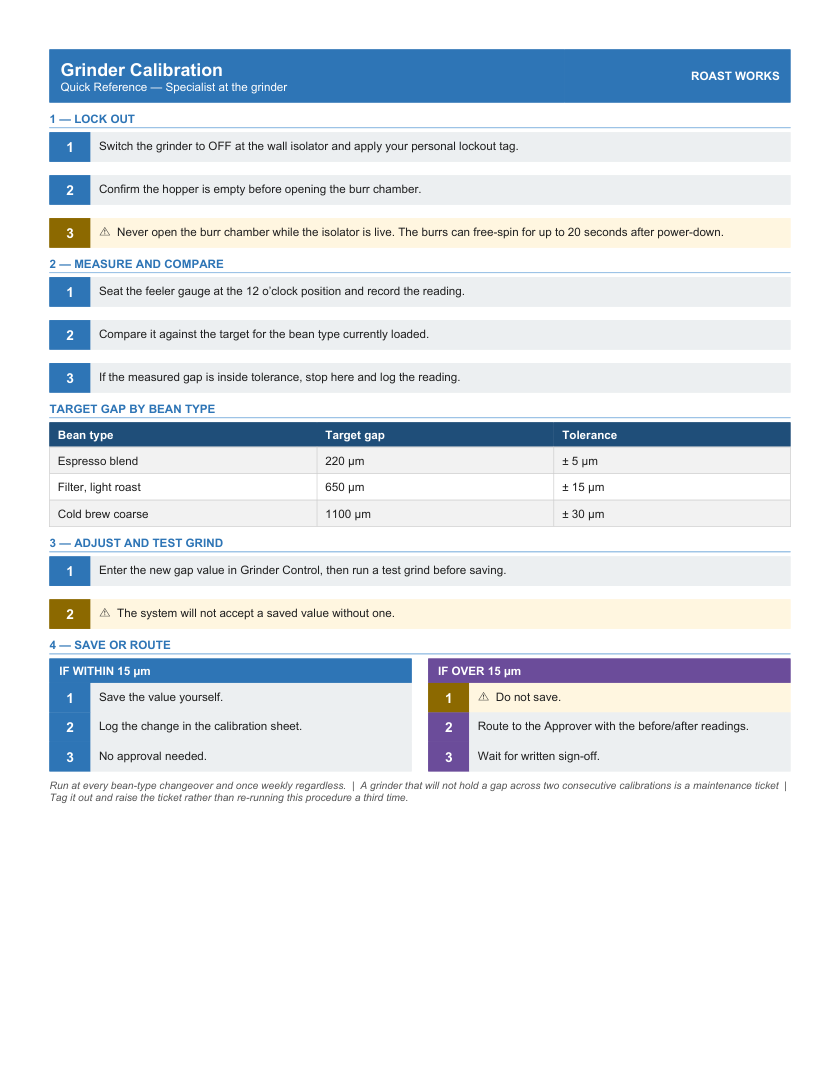
Page 1 of what came back.
What gets checked
Before you get the file, the skill checks the card against the procedure, line by line:
- every line on the card comes from the procedure;
- no line adds a word, a number or a symbol: “220 µm” cannot become “220 mm”, and “±” cannot become “+”;
- each line keeps the procedure’s words in the procedure’s order;
- a warning keeps its “never” or “do not”: “Never open the burr chamber” cannot become “Open the burr chamber”;
- headings and labels carry no instructions of their own;
- the card was not changed in Word after it was built;
- the page, the column widths, the warning cards and the file name are the builder’s, and the name pairs with its procedure.
What no check can tell you: whether a shortened line still means what the procedure meant. Read each line against the procedure before you print it.
If it looks wrong
It says the skill’s files are missing. Once in testing, a chat loaded the skill’s instructions without its files. Claude stopped and said so rather than build an unchecked copy. The same request in a new chat worked.
It is in plain colors, not your brand. The skill did not find your brand. Attach brand.json and logo.png and ask again.
It asked you for a number. The procedure does not give it, and the card will not make one up. Give it the number, or let it leave that section out.
It says the card will not fit. One page is the point of the card. Tell it what to leave out; the full detail stays in the procedure.
Using Claude Code instead
Extract the .skill file into your skills folder: ~/.claude/skills/ for every project, or .claude/skills/ inside one. A skill in that folder does not reach your claude.ai account, and one on your account does not reach that folder.
Needs Node on the machine; the pack is tested on Node 20 and Node 24. Nothing else to install: the one library the skill uses ships inside it.
The skill reads your brand from brand.json and logo.png, looking in this order and stopping at the first hit: the path in HPW_BRAND_KIT, the folder you build from, any folder above it, then the neutral defaults.
To confirm the install, run this from the folder you will build in. Exit 0 means every file is present:
To prove it end to end, build the shipped sample from a folder outside the skill. It prints the check to run on the card; run it as printed and expect PASS — clean: